AR Sketch Studio
- 4.4
- Rating
- 100.00K
- Installs
- Free
- Price
 Analysis by App-foxy
Learning to draw can feel harder than it should. A blank page gives you too many choices at once: scale, proportion, perspective, line weight, and even where to begin. AR Sketch Studio takes a more approachable route by placing a reference image into your real surroundings through augmented reality, so you can follow its visible lines with a pencil or pen. After spending time with it, I see it as a practical bridge between looking at a picture and making marks yourself, especially for someone who wants guidance without enrolling in a formal course.
This is a free art and design app from World Labs Global, aimed at Everyone and available for devices running Android 7.1 or later. Its current version is 2.7, and the app has built a 4.4 average from around 2.3 thousand ratings, alongside over 100 thousand installs. Those figures suggest a healthy level of interest, but they do not tell the whole story. The important question is whether the AR approach actually helps you draw more confidently than a normal reference image, a tracing sheet, or a digital sketching tutorial.
How AR Sketch Studio feels in everyday use
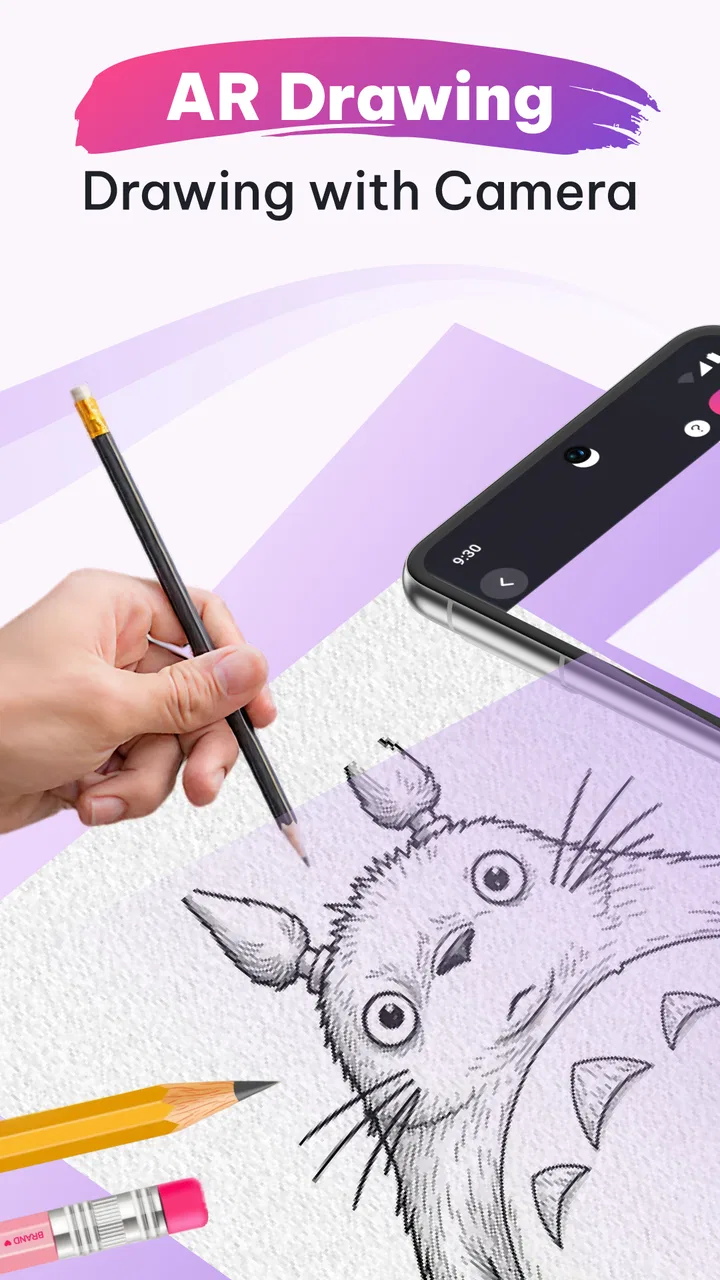
The central idea is simple: rather than copying a reference from a screen placed beside your paper, you use the phone’s camera and augmented reality to position the image over the surface where you want to draw. You then look through the display and trace the visible structure. In practice, this changes the first stage of drawing. Instead of estimating every proportion from scratch, I can concentrate on following contours, noticing relationships between shapes, and gradually building a recognizable result.
You May Also Like

 Blood Strike: 2.5 Anniversary
Blood Strike’s Loadouts Turn Every Drop Into a Tactical Gamble
A close look at Blood Strike’s custom loadouts: how fast access to signature weapons reshapes its battle royale rhythm, rewards preparation, and narrows the gap between fights.

 Pandora - Music & Podcasts
Pandora’s Music Is Easy to Start, but Harder to Recover
Pandora’s strength is its low-effort path from a seed to a station. Its weak spot is how much confidence it asks you to place in connection, setup, and quiet recovery.

 8 Ball Pool
8 Ball Pool Is Built on Rivalries, Rematches, and Routine
A close look at the rivalries, rematches, shared routines, and unanswered safety questions that turn a quick pool match into a persistent mobile community.

 Samsung Music
Samsung Music’s Quiet Strength Is Playing What You Already Own
Its reach comes less from spectacle than from dependable access to a personal library. That simplicity is both the app’s strongest retention engine and its ceiling.

 AccuWeather: Weather Radar
AccuWeather Review: A Quick, Clear Forecast for Everyday Decisions
For everyday plans, the best forecast is the one you can understand quickly. AccuWeather makes rain timing, radar, and local conditions easy to act on, with a few trade-offs.

 Hill Climb Racing
Why Hill Climb Racing Still Turns Crashes Into One More Run
A tiny car, a bumpy hill and one more upgrade: Hill Climb Racing keeps resurfacing because its simple chaos makes every near-miss feel personal.
More From Our News Desk



That makes the app particularly welcoming for beginners who are discouraged by traditional drawing exercises. A person who struggles to draw a circle, outline a face, or place the parts of an object correctly can get an immediate sense of progress. The result is not automatically an original illustration, of course, but it can be a useful first step toward understanding how images are constructed.
The AR presentation also makes the experience more physical than a standard drawing lesson. I am not simply tapping tools on a canvas. I need a real surface, a real drawing instrument, and enough room to hold the phone in a comfortable position. That physical setup is part of the appeal, but it is also where some of the app’s limitations become visible.
The best setup for a clean tracing session
I get better results when the paper is secured before opening the drawing session. Loose sheets shift easily, and even a small movement can make the projected reference stop lining up with the marks already on the page. A desk, clipboard, or firm sketchbook works better than a soft surface. Good, even lighting also matters because the camera needs to see the drawing area clearly while I keep the reference visible on the screen.
There is a useful trade-off between phone position and drawing comfort. Holding the device too close can make the reference large and detailed, but it leaves less room to work and makes the camera view harder to manage. Holding it farther away gives my hand more freedom, though smaller details become less convenient to follow. I recommend starting with a simple subject at a moderate size rather than immediately attempting a detailed portrait.
Another practical tip is to establish the broad outline first and postpone tiny features. If I chase eyelashes, texture, or decorative lines before the main shape is stable, the finished drawing can look polished in isolated areas but still feel incorrectly proportioned. The AR overlay is most useful as a guide to structure, not as a reason to rush through every visible line.
Why the AR method helps beginners
Traditional copying asks the eye to compare two separate spaces: the reference and the paper. That comparison is a real skill, but it can be frustrating at the beginning. AR Sketch Studio reduces the distance between those spaces by putting the guide directly over the place where the drawing is happening. I find that this lowers the mental load during the first few attempts.
It is especially helpful for learning relative size. If the reference shows a cup beside a book, for example, the overlay makes it easier to see how wide the cup should be compared with the book. The same applies to facial features, simple animals, leaves, and household objects. Once the main relationships are in place, I can use the drawing as a study rather than merely a copied picture.
There is also a confidence benefit that a normal image viewer cannot provide as directly. Seeing a recognizable outline appear under my hand gives me a reason to continue. For a child, a casual hobbyist, or someone returning to art after years away, that encouragement can matter more than a sophisticated brush engine.
A realistic use case: a short evening drawing routine
Imagine having twenty minutes after dinner and wanting to sketch without planning a full art project. I would choose a small object from the available reference material, clear a section of the table, secure a sheet of paper, and use the app to establish the outline. After tracing the main contours, I would turn the session into a study by adding shading or changing a few details without following the overlay exactly.
This routine works because it separates the intimidating task of starting from the more enjoyable task of improving. On one evening, the goal can be accurate proportion. On another, it can be cleaner line work. A parent could use the same approach with a child, while an adult beginner could build a small series of drawings without needing a large collection of art supplies.
The important adjustment is to treat the app as training wheels rather than a replacement for observation. If every drawing is traced from beginning to end, progress may remain tied to the overlay. I get more long-term value by using it for the first construction lines, then hiding or ignoring it while I finish the image from memory and observation.
Where it differs from familiar alternatives
A printed reference sheet is cheaper to understand and does not require a camera view, but it asks more of your visual comparison skills. It is a better choice when you want to practice judging angles, distances, and negative space independently. AR Sketch Studio is more immediately accessible because the reference and drawing surface occupy the same visual frame.
A tablet drawing app offers more control over undo, layers, brushes, and color. It is the stronger option for finished digital artwork or for artists who already know how to construct forms. AR Sketch Studio serves a different purpose: it connects a digital guide to a physical drawing process. If your goal is a polished illustration that can be edited endlessly, a dedicated digital canvas will usually be more flexible.
Step-by-step video tutorials are better when you want to understand why a drawing is built in a certain order. A video can explain gesture, perspective, anatomy, or shading decisions in a way that an overlay cannot. The AR approach wins when the immediate problem is getting a first outline onto paper without feeling lost.
What the current version means for users
Version 2.7 is the current release, so this is the version I would judge when deciding whether to try the app now. Its presence suggests that the project has moved beyond a one-off experiment and is being maintained as a usable drawing tool. At the same time, a version number alone does not prove that every device will offer an identical experience, so I would keep expectations focused on the core AR tracing workflow rather than assuming a large professional feature set.
For someone already using an earlier release, the practical question is whether updating changes the way their existing routine feels. The safest benefit of staying current is having the present build rather than relying on an older installation that may behave differently after changes to the phone’s operating system or camera environment. I would update before judging tracking quality, then repeat the same simple drawing test on the same surface and under similar lighting.
New users should not interpret the current version as a promise of advanced instruction. The app’s strength remains the direct relationship between reference and paper. It is most convincing when used for guided practice, not when treated as a complete art education platform.
The friction points you should expect
The phone becomes part of the drawing equipment, which means the experience is less relaxed than opening a sketchbook. I need to keep the camera pointed at the surface while also seeing enough of the reference to work accurately. That can create an awkward posture during longer sessions, particularly when drawing near the edge of a desk or working on a large sheet.
AR alignment is another practical concern. If the device moves, the projected guide may no longer match the marks on the paper. This is not the same as a failed drawing lesson; it simply means the user has to reset their position and continue carefully. Someone who wants a completely stable reference may prefer a printed image or a second screen placed beside the paper.
The method can also encourage overly literal copying. Tracing a line teaches hand movement and proportion, but it does not automatically teach volume, light, composition, or visual decision-making. I would be cautious about calling a traced result proof that I have mastered drawing. The app is more valuable when each guided session is followed by a small independent exercise.
There is a financial point to consider as well. The app is free to start, while in-app purchases range from $3.99 to $39.99 per item. That makes it easy to test the basic idea before spending anything, but I would look carefully at which content or capabilities are included in any purchase and whether they match my actual practice goals. A beginner who only wants occasional tracing should avoid paying for more than they will use.
Who will get the most from it
I would recommend AR Sketch Studio to beginners who want visible guidance, parents looking for a hands-on creative activity, and casual artists who enjoy drawing on paper but need help starting. It can also suit someone returning to sketching after a long break, because the first successful outline arrives sooner than it might through freehand practice alone.
It is less suitable for an experienced artist seeking detailed lessons in anatomy, perspective, or digital painting. It is also not my first choice for people who dislike holding a phone while drawing, work mainly on oversized surfaces, or want a workflow built around layers and revisions. Those users will likely be happier with a stable printed reference, a structured course, or a dedicated tablet application.
Children can use the concept easily, but an adult should still help with the physical setup. A stable surface and sensible phone placement make the activity more comfortable and reduce the chance of abandoning it after a frustrating first attempt. The Everyone content rating makes it broadly approachable, yet the quality of the experience still depends on supervision, patience, and choosing subjects that match the learner’s ability.
Small workflow changes that improve the results
One of the most useful habits is to create a two-pass drawing. In the first pass, I use the AR guide only for the largest shapes and important landmarks. In the second, I move my attention away from the overlay and refine the image by looking at the paper. This produces a more personal result and turns the session into actual observation practice.
I also recommend keeping the first subject simple enough to finish. A single object with a clear silhouette is better than a complicated scene that demands constant repositioning. Finishing a modest drawing teaches more about the app’s setup, alignment, and pacing than abandoning an ambitious one halfway through.
A third useful approach is to compare three versions over time: one traced closely, one completed with the guide only for the outline, and one drawn from the reference beside the paper. The differences reveal where the AR assistance is helping and where independent skills still need attention. This turns the app from a shortcut into a way of measuring progress.
What I would like to see next
When I think about the product’s future, I would watch for improvements that make longer physical drawing sessions easier rather than simply adding more decoration. Better control over scale and placement would matter because different paper sizes and desk layouts change how comfortable the workflow feels. Clearer guidance about maintaining alignment would also help newcomers avoid blaming themselves for setup problems.
I would also value learning support that explains the purpose behind a traced line. The current concept is strongest as a visual guide, but short prompts about construction, proportion, or when to stop tracing could help users move toward independent drawing. That would preserve the app’s beginner-friendly character while making it more useful for continued practice.
Existing users should judge future changes by whether they improve reliability and learning, not merely by the appearance of a longer content catalog. More reference choices are welcome, but a smaller set of well-chosen subjects paired with better workflow guidance could have a greater effect on actual progress.
My recommendation after using it
AR Sketch Studio is best understood as a confidence-building drawing aid, not a complete replacement for art practice. Its AR approach solves a very specific beginner problem: how to translate a reference into a first set of marks without getting overwhelmed by proportion. That is a meaningful strength, and it makes the free entry point worth trying for anyone curious about guided sketching.
I would start with a simple object, use a firm surface, keep the phone steady, and treat the overlay as temporary support. If the first session feels awkward, I would adjust the physical setup before deciding that the app is ineffective. The experience depends heavily on how the phone, paper, lighting, and drawing posture work together.
For my own recommendation, the app earns a place in a beginner’s toolkit when the goal is to draw on real paper and build momentum. I would choose a printed reference or a digital art app for independent observation or finished artwork, and a structured course for deeper instruction. But if you want an approachable way to begin drawing today, AR Sketch Studio offers a clear, hands-on path, with enough flexibility to become more than simple tracing when you deliberately use it to practice seeing.
Because it is free and carries an Everyone rating, trying the basic experience is relatively straightforward. Just remember that optional purchases can reach $39.99 per item, so I would explore the workflow first and spend only if the available additions genuinely support the way you draw. For the right user, especially a hesitant beginner, that balance of immediate help and gradual independence is the app’s most convincing quality.
FAQs for AR Sketch Studio
01What is AR Sketch Studio and how does it work?
AR Sketch Studio is a drawing and tracing app that uses augmented reality to place digital sketch guides over the real world through your phone’s camera. After choosing or importing an image, you can view it on a surface and follow the projected lines on paper. The app is designed to help beginners practice proportions, outlines, and basic drawing techniques rather than automatically create a finished artwork.
02Do I need a special device or accessories to use AR Sketch Studio?
You generally only need a compatible Android or iPhone with a working camera, sufficient storage, and support for the app’s augmented-reality features. A tripod or phone stand is not always required, but it can make the experience much easier because the camera must remain steady while you draw. Good lighting and a flat drawing surface also improve alignment and tracing accuracy.
03Can I use my own images in AR Sketch Studio?
In most cases, AR Sketch Studio allows users to work with images selected from the device or with designs available inside the app. Personal images can be useful for portraits, objects, logos, and reference sketches, although the exact import options may depend on the version installed and the operating system. Before downloading, check the current listing for supported formats and image-access permissions.
04Is AR Sketch Studio free to download and use?
The app may be available as a free download, but some tools, templates, or advanced functions can require in-app purchases or a subscription. Advertising may also be included in the free experience. We recommend reviewing the pricing information shown on the Google Play Store or App Store before starting a trial, especially if the app offers recurring billing. Removing a subscription normally requires cancellation through your store account.
05Is AR Sketch Studio suitable for beginners and children?
AR Sketch Studio can be helpful for beginners because it provides a visual guide instead of requiring users to estimate every proportion from scratch. It may also be enjoyable for children interested in drawing, but younger users should use it with adult supervision. Parents should review advertisements, purchases, camera permissions, and privacy details, while remembering that the app supports learning and practice rather than replacing real drawing instruction.
Pros
- Turns photos into useful drawing references with adjustable transparency.
- Includes guided overlays that help beginners understand proportions and perspective.
- Works well for practicing on paper without requiring advanced artistic skills.
- Offers a creative way to trace
- sketch
- and experiment with different subjects.
- Simple controls make the main tools easy to access during a drawing session.
Cons
- Accuracy depends on your phone’s camera position and a stable surface.
- Some advanced tools or content may require in-app purchases.
- The overlay can be difficult to see in bright outdoor lighting.
- Long drawing sessions may drain the battery due to camera usage.
- Results can feel restrictive if you prefer completely freehand drawing.

AR Sketch Studio
Gallery